
Targeting Known/Unknown and List Membership
Digioh supports targeting (and anti-targeting) of campaign displays to known Iterable User’s Profile Fields (attributes) and/or list membership.
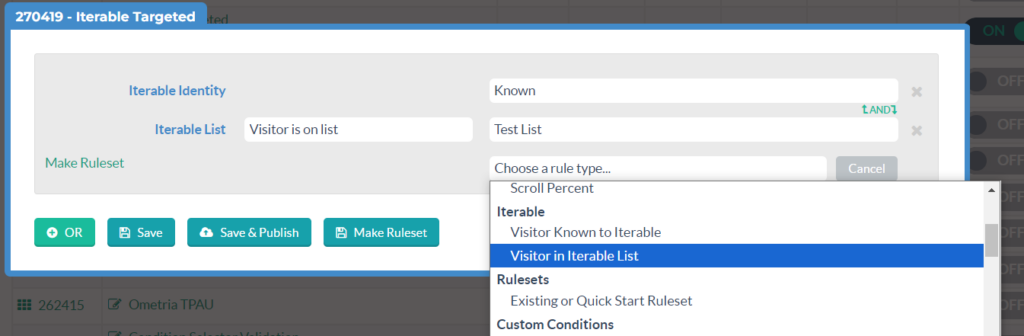
After you have installed the App and configured Account Metadata, Iterable targeting rules are available in Campaign Conditions:
Targeting User Profile Fields
This extension works by retrieving and caching Iterable user profile fields in real-time, and making the data available in a JavaScript object DIGIOH_API.itrbl that you can reference in Campaign conditions.

In general, reference user profile fields by name like this:
What does this extension do?
- Flexible general-purpose event tracking from site to Iterable, e.g. conversion tracking and marketing attribution
- Anonymous User Tracking (AUT) is closely related to event tracking. It queues up events until the user is known, then sends everything to Iterable, which is essentially a “profile merge”. The other half of AUT is cross-device identification, based on Digioh form input, URL query string, or extraction from Iterable SDK
- Targeting Digioh Campaigns based on Iterable user profile data (fields, list membership, in-app messages)
- Personalizing Digioh Campaign content based on Iterable user profile fields
- Digioh Campaign-Form auto-fill
- Tracking site pageviews to Iterable with a wide range of analytics data, including marketing attribution and geo-location data
- Tracking campaign interaction events to Iterable with form and analytics data, e.g. to trigger campaigns based on campaign conversion
- Cross-device identification and profile merging
- Cart abandonment, browse abandonment, and customized user experience based on cart/product interactions
All of the above works when a visitor is known, which raises the question:
When is a visitor “known”?
A visitor is known if either of these happens:
- Digioh collected their email earlier on that device
- They arrived to your site via email with proper configuration for it (see below)
- You set up a JS var to identify users (also see below for guidance).
Requirements
To use the extension, you will need at least one authenticated Iterable Integration configured in your Digioh account.
Installation instructions
- From the Digioh HQ go to your profile menu top right, pick Extensions, then find and install “Target Iterable user attributes and lists”.
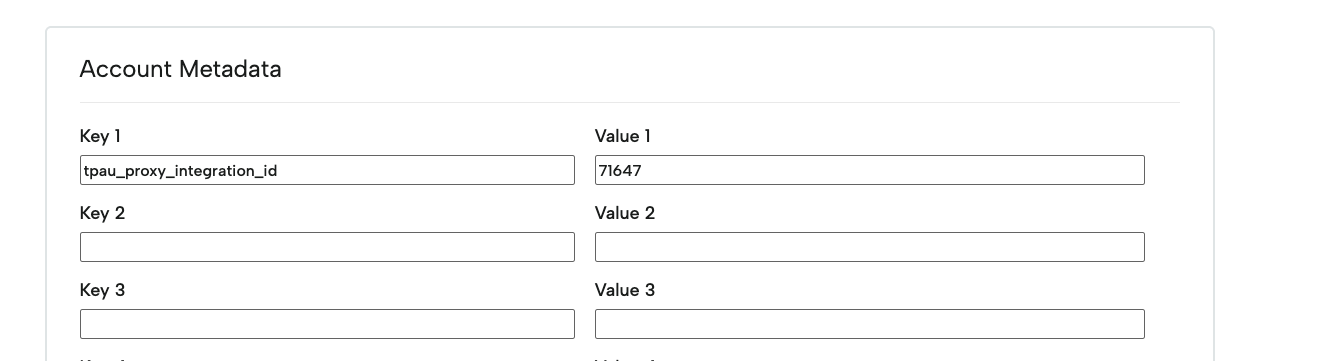
- To configure the extension, from the profile menu top right, go to Account Metadata and add metadata tpau_proxy_integration_id, with the ID of the authenticated Iterable integration from the Integrations list:
 Along with configuring a default integration for the entire account, you can also configure site-specific integration IDs that use their own Iterable integration using the Key tpau_proxy_integration_id:domain_url. This is useful if you are running multiple sites out of a single Digioh instance and/or have a sandbox site that you want to point to your Iterable sandbox:
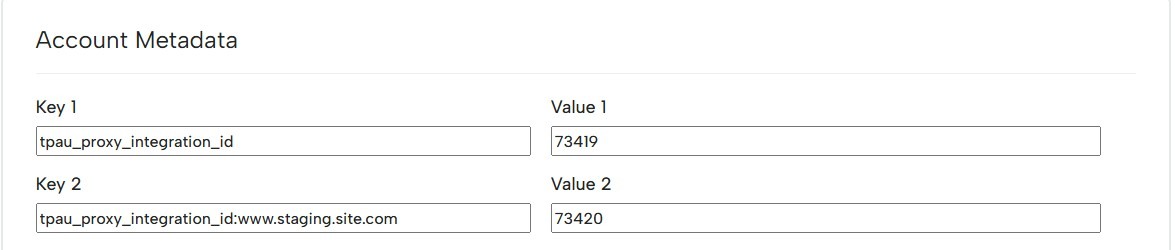
When configuring metadata for a specific site, you will need to use the full, exact domain (include “www.”).
And that’s it!
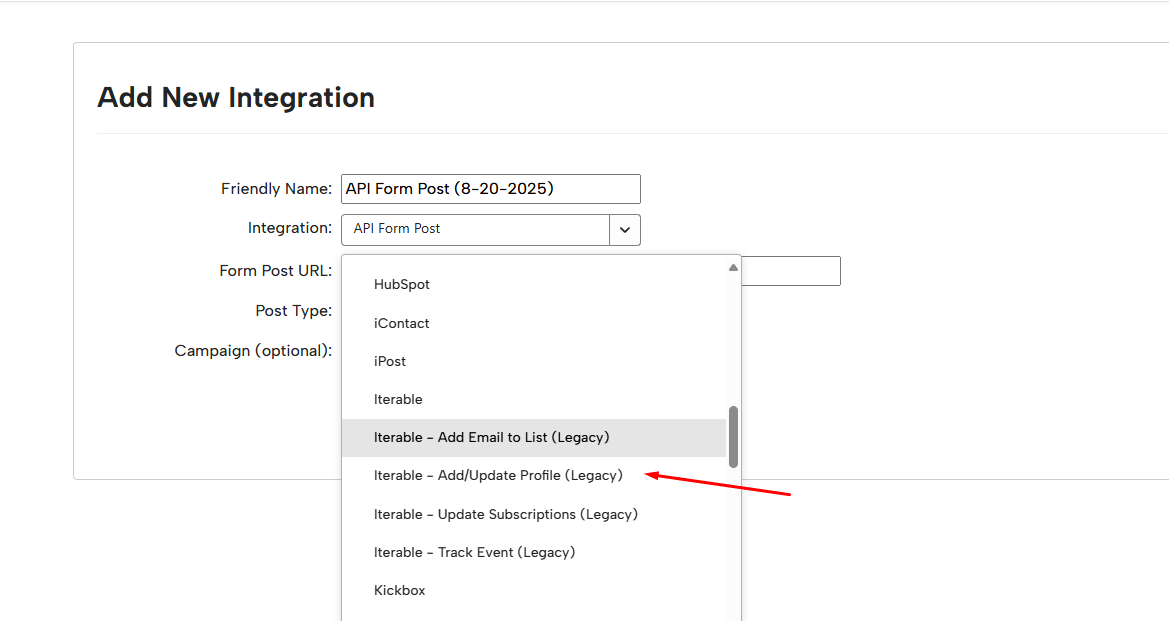
IMPORTANT SECURITY NOTE: By default, this app potentially exposes the Iterable User Profile Fields in the browser. If your user profiles contain PII or otherwise sensitive data, you must configure the integration to “Restrict Profile Data” and select only the non-sensitive fields that you wish to use for targeting. In order to achieve this, you would need to use one of our legacy Iterable connections and add the restriction:
What to do once installed
There are two other main steps you need to take after installing this extension:
- Set up any requirements to identify users, so the rest of your implementation works
- Get the most out of this extension via targeting and personalization
Diagnostics: User identification
This extension is “silent”, but you can access a control panel and helpful diagnostic information when using ?boxqamode on the URL.
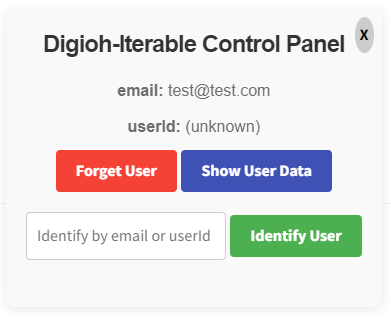
If either email or userId is shown (or both), then the user is “known”.
- Forget User: clear all data associated with the user and become “unknown”
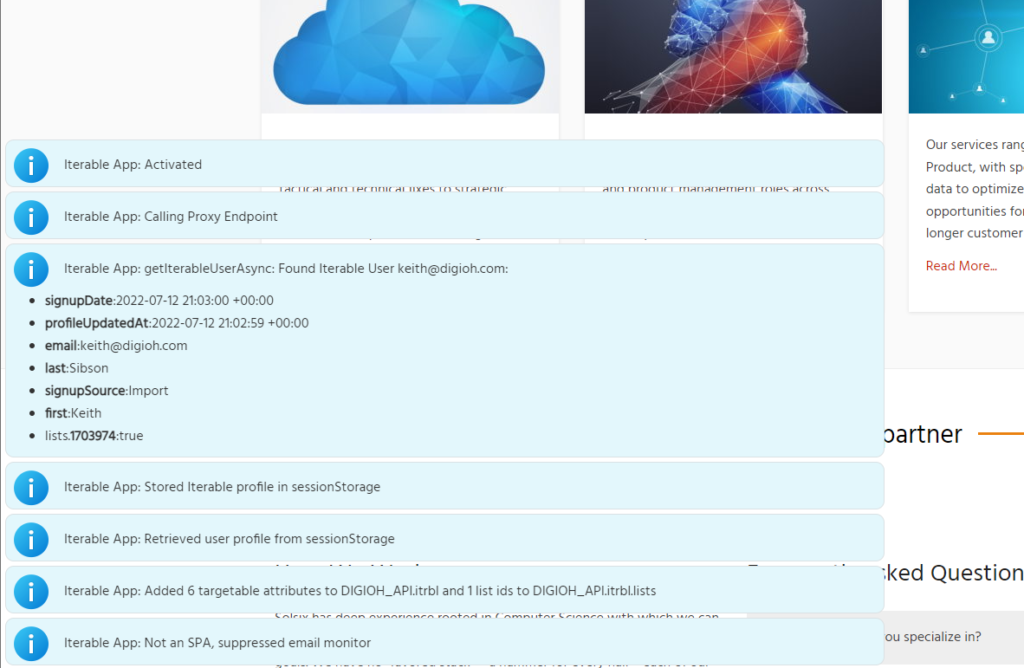
- Show User Data: displays a notification containing all of the targetable data and data that can be used to personalized for the known user
- Identify User: become known as the user with given email or userId
Pay attention to the notifications from the Iterable app, especially red error messages. Errors are typically “fatal”, especially configuration errors, and must be corrected before the app can function properly.
Linking Iterable User Identity to Digioh
Digioh will retain and use the email identity of users where a Digioh campaign collected their email, but you can and should expand this to include existing Iterable users too, especially if have existing mechanisms to create users in Iterable, e.g. native email signup forms or a login process.
If you have configured the Iterable JavaScript SDK and are using the Link Tracking Domain feature, Digioh will grab the email or userId from that if available, and this should work by default. If not, please reach out to support@digioh.com so we can investigate.
Otherwise, you can set up identify-on-email-click up manually by updating your Iterable email campaign templates so that most or all links to your site include either of these identities on the URL query string, using handlebar syntax:
- ?email={{email}}
- ?userId={{userId}}
We recommend using userId if possible (if you have a userId Iterable project), since that is more secure.
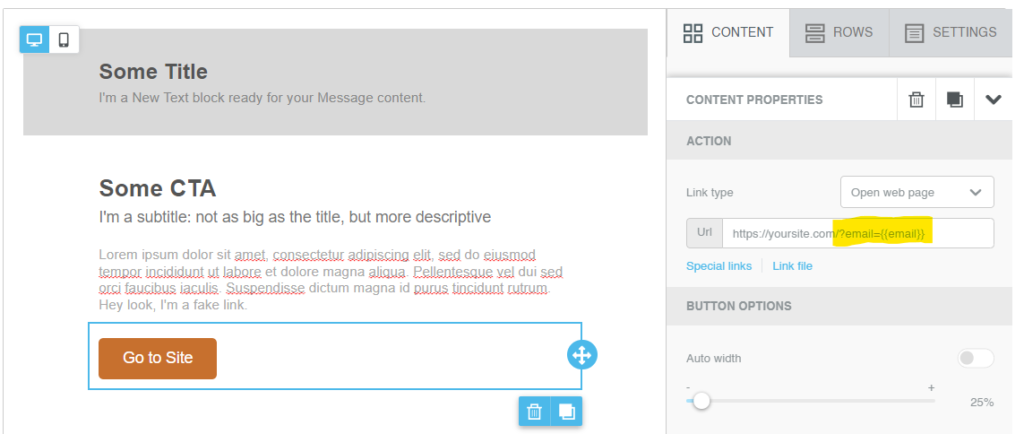
This way, any clicks on an email will identify that user to Digioh and activate targeting capabilities. You don’t have to instrument all of your emails in this way, but we recommend that you do so for links in your most commonly clicked emails to maximize the “penetration” of identity sync within your user base. For example, if you have a double opt in email signup process and/or a welcome email, definitely add the email parameter to those.
Using JS Vars
If you have a website with a login, and through it you can easily access an email or userId, we highly recommend (and support) using that to identify users. This is what you need:
- A JS Var that allows Digioh to access it (it can be either email or userID)
- You can test if this works by calling it in the console: “DIGIOH_API.myVar.xyz“
- Add it in account metadata with the key tpau_userid_source_var

After that, Digioh will automatically access that and ID users!
Targeting Known/Unknown and List Membership
Digioh supports targeting (and anti-targeting) of campaign displays to known Iterable User’s Profile Fields (attributes) and/or list membership.
After you have installed the App and configured Account Metadata, Iterable targeting rules are available in Campaign Conditions:
An Iterable user is “known” to Digioh if they have been identified with any methods explained above.
Available lists are pulled automatically from your Iterable instance. Dynamic lists (aka Segments) are not supported at this time since the Iterable API does not support lookup of Dynamic List membership on a per user basis.
Targeting User Profile Fields (Advanced)
This app works by retrieving and caching Iterable user profile fields in real-time, and making the data available in a JavaScript object DIGIOH_API.itrbl that you can reference in Campaign conditions.
In general, reference user profile fields by name like this:
DIGIOH_API.itrbl.attributeName
Note: Digioh can create “Custom Conditions” for you based on your needs to make targeting easier for non-technical users, just ask Support.

Anti-Targeting Iterable Data
When anti-targeting user profile fields, note that the JS Var condition does not equal will be true for unknown users, so if you want to anti-target known users that do not have favoriteColor = green you should also check if they are known:

Without the first condition here, the campaign would display to all unknown users, which is probably not what you want. If you do want to target unknown users, you can use JS Var DIGIOH_API.itrbl.unknown Equals true. Equals is very important, because if you use the default “contains” comparison, it will assume a string and Boolean true does not “contain” anything.
Personalization
You can personalize the context of your campaigns by using merge tags that replace with Iterable user field data. To do this, install the separate Universal Merge Tags app. With this app, you can use the merge tag [ITERABLE_FIELD|fieldName|defaultValue].
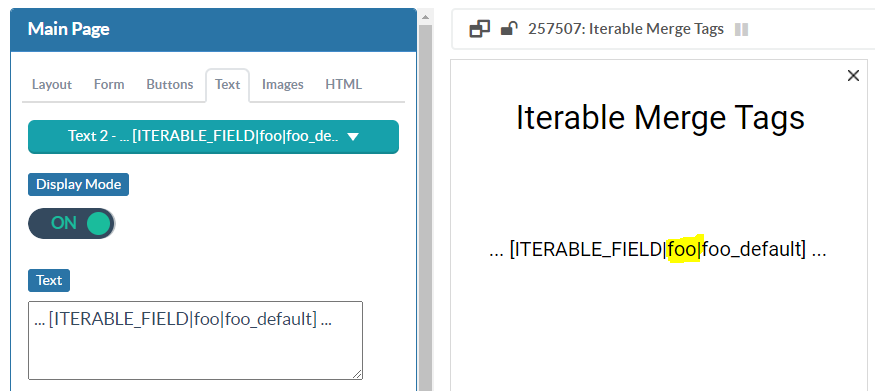
defaultValue is optional, but recommended. It is used when the user is unknown or does not have the named field in their Iterable profile, or the named field is blank.
When using Iterable merge tags, we recommend that you condition the campaign based on DIGIOH_API.itrbl.known = true. While default merge tag values will work for unknown users, usually you want to personalize only the experience of known users.
Tracking Events to Iterable
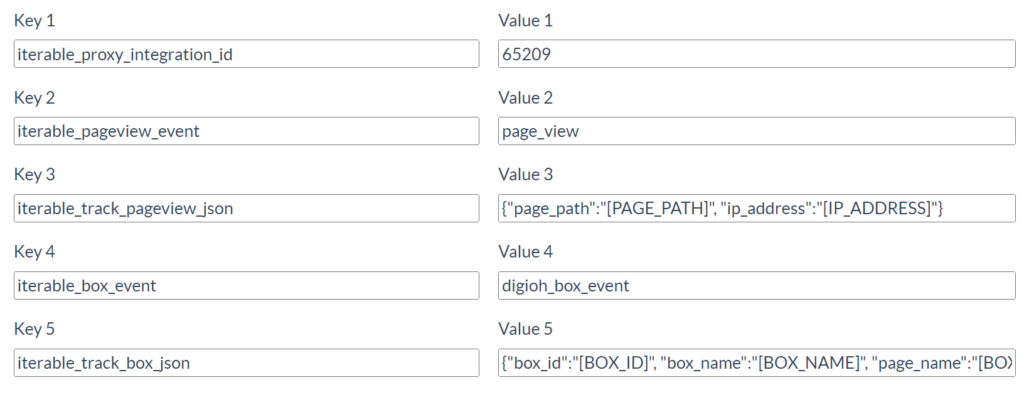
This app can be configured to track page view and campaign events to Iterable using metadata at any of account, campaign, or campaign-page level. The commands are:
- tpau_pageview_event: name of the event to send on every web page view, must be configured in Account Metadata
- tpau_track_pageview_json: JSON for the event payload, supporting all UMT merge tags, must be configured in Account Metadata. Example: {“page_path”:”[PAGE_PATH]”, “ip_address”:”[IP_ADDRESS]”}
- tpau_box_event: name of event to send on campaign-page view
- tpau_track_box_json: JSON for the event payload, supporting UMT merge tags. Example: {“box_id”:”[BOX_ID]”, “box_name”:”[BOX_NAME]”, “page_name”:”[BOX_PAGE]”}
Box-page tracking is based on the level of the metadata config. Campaign-Page-level will track for just that page, so is ideal for conversion events. Campaign-level will track on all pages for that campaign. Account-level will track on all pages of all campaigns. The App will track the most specific event, so if you have both campaign-page and campaign level event config, only the campaign-page event will be tracked.
Skipping the Email Collection Page for Known Users
When using Iterable Owned Identification, you can automatically skip an email collection page if the visitor is already known to Digioh / Iterable.
This is useful for quizzes or surveys where returning users shouldn’t be asked for their email again.
How to Configure
-
Identify the page that collects email
-
The page must have a form enabled
-
The Email field must be enabled on that form
-
-
Add page-level metadata to the email collection page:
-
- Key: when_exists
- Value: page number you want it to skip to, for example, ep6 or thx
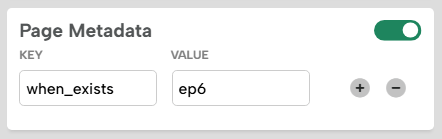
Note: This doesn’t auto-submit the form; it simply skips the specified page.
Interoperating with your own site JavaScript
From your own on-site JavaScript (or JavaScript in a Google Tag Manager tag), there are several app functions you can call to interoperate with the app for advanced use cases. All functions are defined in the window.DIGIOH_API object.
- DIGIOH_API.setIterableEmail(email): set or replace known user profile with email
- DIGIOH_API.setIterableUserId(userId): set or replace known user profile with userId
- DIGIOH_API.clearIterableData(): remove all known user info and become unknown
- DIGIOH_API.trackIterableEvent(eventName, payloadObj, options): tracks custom event to Iterable, or queues it if the user is unknown, option is an object with (optional) properties:
- updateEventId: updates an existing event with this ID
- createdAt: override the default date with this Unix epoch time (seconds since 1970)
- DIGIOH_API.createOrUpdateIterableEmail(email, {optional:”foobar”}): “upsert” a new email in Iterable optionally setting user profile fields.
Important Note: Digioh is dynamically loaded JavaScript, so they may not be available if you try to call them immediately on page view. The app recognizes a special event queue (similar to dataLayer) that you can push event objects into and they will be processed as soon as Digioh activates. Before calling the Digioh functions, check to see if they are defined and if not, push events like this:
window.digiohEventQueue = window.digiohEventQueue || [];
window.digiohEventQueue.push({eventName:”preload_test_event”,eventPayload:{event_val : 1}});
Any events in window.digiohEventQueue will be processed as soon as Digioh activates.
Technical Details
Digioh is a JavaScript component running in the browser that:
- Mediates the identification process
- Sends event data and/or known user profile updates to Iterable
- Caches known user Iterable data in sessionStorage for targeting and personalization of Digioh Campaigns
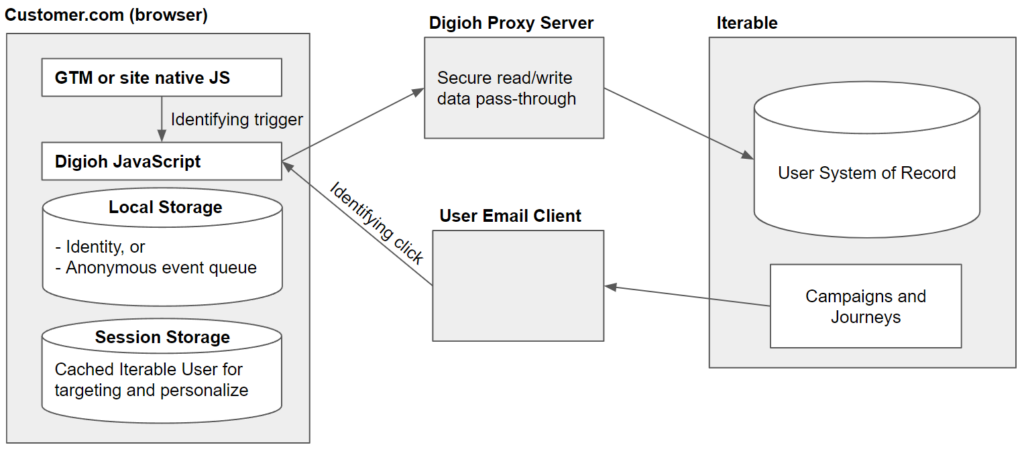
When a user is unknown, Digioh retains the queue of events and/or profile updates until the user becomes known, at which point it will process the queue to the Iterable database.
All read-write operations are via a Digioh server proxy which a) protects the API key, and b) limits the data that can be read from Iterable and exposed in the browser (e.g. sensitive PII would not be readable).
Identification can happen via an email click, an explicit call to Digioh JS from your site-native JS or Google Tag Manager, or via user email input into a Digioh Campaign (not shown in diagram). In addition, if you already have the user email or userId in a cookie, localStorage, or JavaScript variable, the Digioh Implementation Team can customize our solution to automatically identify users from those sources.
Running into an issue or have a question? Reach out to our support team via support@digioh.com and we’ll be happy to help!