
What is Digioh Passport?
Digioh Passport is how Digioh progressively builds persistent user profiles for your website visitors without relying on third-party cookies, and by overcoming browser-level tracking prevention, which deletes cookies after just 24 hours.
When a visitor is identified by Digioh (through a form submission, an email click-through, or a login event), Digioh stores that identity in its own durable layer, separate from your ESP’s cookie. That identity is then passed back to your ESP and reused for targeting, personalization, and behavioral tracking every time that visitor returns to your site, regardless of whether the original cookie has been cleared.
The Problem Passport Solves
Most website visitors browse with cookie tracking restrictions in place, and many modern browsers automatically delete tracking cookies within 24 hours. This creates a critical gap in your marketing stack:
- A visitor arrives on your site from an email. Your cookie is set and they are identified.
- They add items to their cart but do not complete checkout. An abandon cart email is triggered.
- After 24 hours, Safari deletes the tracking cookie. The visitor is now anonymous to your site.
- Any subsequent site visit, even from a known subscriber, generates no personalization, no abandon browse trigger, and no re-targeting.
The abandon cart and abandon browse email flows are typically the highest-converting automations for ecommerce brands. Losing them after 24 hours represents a significant and ongoing revenue gap.
How Passport Works
Digioh Passport operates in three stages:
1. Identify
When a visitor submits a Digioh form (pop-up, quiz, inline, etc.) or clicks through from a properly configured email link, Digioh captures and stores their identity (email and/or user ID) in its own encrypted local storage layer. This identity is linked to the visitor’s profile in real time.
2. Recover
If the tracking cookie is subsequently deleted by the browser, Digioh detects the loss and automatically re-establishes the identity for that visitor using the identity it has retained. The cookie is effectively refreshed without requiring the visitor to re-identify themselves.
3. Activate
With a live, recovered identity, Digioh can now power on-site targeting and personalization using data from the user’s profile. This includes showing or suppressing specific campaigns based on subscription status, list membership, segment, or custom profile attributes – all in real time.
Key Benefits
Cookie-Independent Identity
Digioh’s identity layer persists beyond the 24-hour browser cookie window. Known subscribers who return to your site after their cookie has been cleared are still recognized and can still receive personalized experiences and trigger automated flows.
Cross-Browser and Cross-Device Support
Passport is not dependent on any single browser’s cookie behavior. It works across Safari, Chrome, Firefox, and mobile browsers, and supports cross-device identification when users click through from emails on multiple devices.
On-Site Targeting and Personalization
Once a visitor is identified, Digioh can use data from the user’s profile to control which campaigns are shown. Common targeting use cases include:
- Suppressing email opt-in pop-ups for visitors who are already on your list
- Capturing phone numbers for known email subscribers
- Showing VIP-exclusive offers to customers in a specific list or segment
- Displaying a personalized welcome message using the visitor’s name or attributes from their profile
- Capturing phone numbers for known email subscribers
- Triggering an abandon cart pop-up for identified visitors who have items in their cart
- Re-engaging lapsed customers with targeted discount offers
Expanded Event Tracking
Because Digioh now knows who a visitor is even after the cookie has expired, it can attribute more on-site behavioral events (Add to Cart, Checkout Started, Page Views) back to a known profile. This means more events get matched to real subscribers, increasing the reach of your automated flows.
Revenue Reporting
When Google Analytics is authenticated in Digioh, the ID Grid reporting dashboard shows how much revenue is attributable to Digioh Passport. This includes the number of visitors identified, the number of IDs recovered (i.e. would have been lost without Passport), and the incremental revenue those identified sessions contributed.
How Visitors Become Identified
Digioh identifies visitors through several methods. The more of these you configure, the greater the percentage of your audience that Passport will cover:
Digioh Form Submission
When a visitor submits any Digioh campaign form (pop-up, quiz, inline, banner, etc.) that collects an email address, Digioh immediately stores that identity and syncs it to your ESP.
Email Click-Through
When a visitor arrives at your site by clicking a link in one of your emails, Digioh can read the identity from the URL query string (e.g. ?email={{email}} or ?userId={{userId}}) and identify that visitor automatically – no form submission required. This is recommended for your highest-traffic emails such as welcome flows and double opt-in confirmations.
JavaScript SDK
If your ESP supports an on-site JavaScript SDK (e.g. Klaviyo’s JS, Iterable’s SDK with Link Tracking Domain), Digioh can read the identity from the SDK if it is already present, without requiring any additional configuration.
JavaScript Variable or Custom Integration
If your site exposes the user’s email or ID in a JavaScript variable (e.g. from a login session), you can configure Digioh to read from that variable via Account Metadata. The Digioh Implementation Team can also set up automatic identification from cookies, localStorage, or any other available data source.
Passport Works Best When…
Passport gets stronger as you bring more of the Digioh platform together. Specifically:
- Launching additional Digioh campaigns (pop-ups, quizzes, etc.) means more email capture opportunities, which increases the percentage of your audience that Digioh can identify.
- Using Digioh campaigns to capture zero party data on existing subscribers to provide personalized experiences.
- Google Analytics authentication unlocks revenue reporting in the Digioh ID Grid dashboard.
- Configuring email click-through parameters in your ESP email templates maximizes identity penetration across your subscriber base.
Supported Platforms
Digioh Passport is available as an extension for the following platforms. Each integration has its own setup guide covering installation steps, account metadata configuration, and how to use targeting and personalization features within Digioh campaigns:
Measuring Success
Track these metrics to measure the impact of Digioh Passport:
- Recognition Rate: what percentage of site visitors Digioh is identifying
- Engagement Rate: interactions with personalized campaigns vs. generic
- Conversion Rate: form completions and downstream purchases
- User Experience: satisfaction and retention signals
Testing and Diagnostics
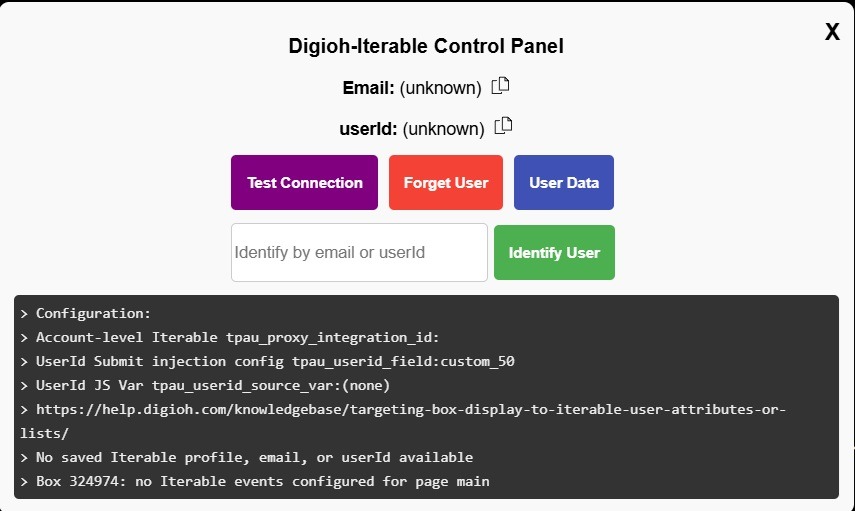
Digioh Passport runs silently on your site once installed. To inspect its behavior during testing or troubleshooting, append ?boxqamode to any URL on your site. This activates Digioh’s QA Mode and surfaces a control panel showing:
- Whether the current visitor is “known” or “unknown” (i.e. whether Digioh has an identity on file)
- The email and/or user ID Digioh has associated with this visitor
- All targetable profile data currently loaded from your ESP
- Any error messages from the extension (red messages indicate fatal configuration errors that must be resolved)
- Buttons to manually identify, forget, or inspect the current user
Technical Details
Digioh is a JavaScript component running in the browser that:
- Mediates the identification process
- Sends event data and/or known user profile updates to your ESP
- Caches known user data in sessionStorage for targeting and personalization of Digioh Campaigns
When a user is unknown, Digioh retains the queue of events and/or profile updates until the user becomes known, at which point it processes the queue to your ESP.
All read-write operations are via a Digioh server proxy, which a) protects the API key, and b) limits the data that can be read from your ESP and exposed in the browser (sensitive PII would not be readable).
Identification can happen via an email click, an explicit call to Digioh JS from your site-native JS or Google Tag Manager, or via user email input into a Digioh Campaign. In addition, if you already have the user email or userId in a cookie, localStorage, or JavaScript variable, the Digioh Implementation Team can customize the solution to automatically identify users from those sources.
For questions or assistance, contact the Digioh support team at support@digioh.com.