
Klaviyo: Restrict Profile Fields
As of March 2026, Digioh has updated the Klaviyo integration to have profile field restriction enabled ON by default. This was updated to align with security best practices.
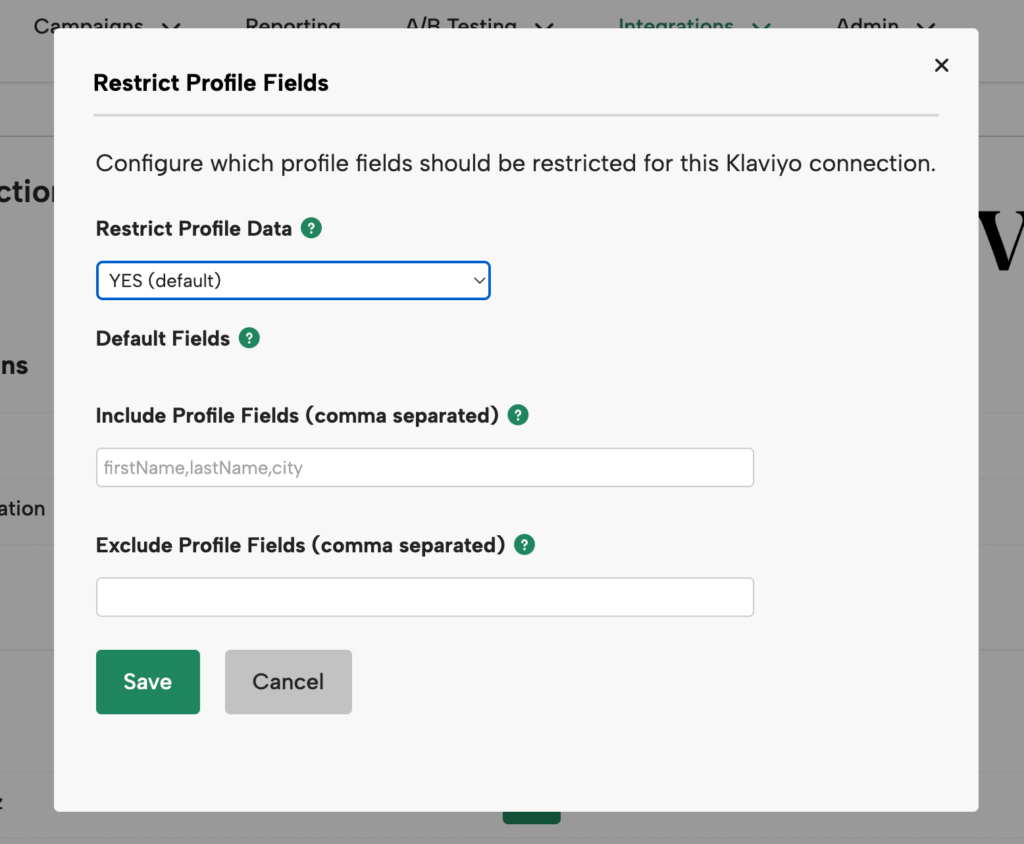
Use Restrict Profile Fields to control exactly which Klaviyo profile fields Digioh includes (or removes) when syncing profile data. This helps reduce the amount of sensitive subscriber data that flows through the integration. As a security standard, this setting is enabled ON by default for all Klaviyo integrations.
Where to find it
- In Digioh, go to Klaviyo Connections.
- Next to the connection you want to edit, click Restrict Profile Fields to open the settings modal.
Settings explained
Restrict Profile Data
- YES (default): Turns on field filtering.
- NO: Sends all profile data with no restrictions.
Include Profile Fields
- A comma-separated list of field paths to include.
- Leave blank to use the default fields (recommended for most setups).
- Fields you list here are included in addition to the default fields.
Exclude Profile Fields
- A comma-separated list of field paths to remove.
- Excludes apply even if the field is in the defaults or in your include list.
Default fields (always included when Restrict Profile Data = YES)
You do not need to add these to your Include list. These are always included by default:
- lists
- segments
- data.id
- data.type
- data.attributes.email
- data.attributes.external_id
- data.attributes.first_name
- data.attributes.locale
- data.attributes.location.timezone
- data.attributes.location.country
- data.attributes.properties.$consent
- data.attributes.properties.Accepts Marketing
How to build field paths (dot notation)
Field names use dot notation—you start inside data, then follow the JSON keys down to the field, separated by periods.
Quick pattern:
data.[next key].[next key].[field name]
Common examples
- Email → data.attributes.email
- City → data.attributes.location.city
- Region → data.attributes.location.region
- Zip → data.attributes.location.zip
- Favorite color (custom property) → data.attributes.properties.favorite_color
- Profile type → data.type
- Profile ID → data.id
Tip:
- Simple attributes are under data.attributes (example: data.attributes.email).
- Location fields add .location (example: data.attributes.location.city).
- Custom properties add .properties (example: data.attributes.properties.favorite_color).
Configuration examples
Example 1: Keep defaults + add a few fields
If you want the default fields plus city, region, and favorite_color, set:
- Restrict Profile Data: YES
- Include Profile Fields:
data.attributes.location.city, data.attributes.location.region, data.attributes.properties.favorite_color - Exclude Profile Fields: (leave blank)
Example 2: Keep everything except a few sensitive fields
If you want everything except latitude, longitude, and ip, set:
- Restrict Profile Data: YES
- Include Profile Fields: (leave blank — defaults are enough)
- Exclude Profile Fields:
data.attributes.location.latitude, data.attributes.location.longitude, data.attributes.location.ip
Important notes
- Do not exclude both data.attributes.email and data.attributes.external_id. At least one is required for the integration to identify subscribers.
- Field names are case-sensitive—they must match your Klaviyo payload exactly.
- Click Save in the modal to keep changes. Clicking Cancel (or closing the modal) discards edits.