
Showing a campaign to visitors who are about to leave your site gives you one last opportunity to keep them engaged. Here are the key things to get right.
Start with a strong offer
The visitor is already on their way out – give them a reason to stay. The following types of offers tend to perform well:
- Free shipping
- Percentage-based discounts
- One-time-use coupon codes
- A quiz that helps them find the right product
Make your campaign stand out
Your campaign appears the moment the visitor moves to leave, so it needs to catch their eye immediately. Use a light campaign on a dark background, styled to match your brand fonts and colors.
Keep it simple
Include one button with a clear call-to-action. Keep the message focused. Examples that work well:
- “Get free shipping now”
- “Save 10% now”
- “Find your perfect product”
Set up your thank-you page
After a visitor submits the campaign, thank them and remind them to check their email for their incentive. For example: “Thanks! Your free shipping code is on its way to your inbox.”
We recommend sending the coupon code by email rather than displaying it on the thank-you page. This ensures visitors enter a valid email address to receive it.
Use the right Display Rules
The following Display Rules cover most exit-intent scenarios. Configure them together for a campaign that shows at the right moment without overexposing itself.
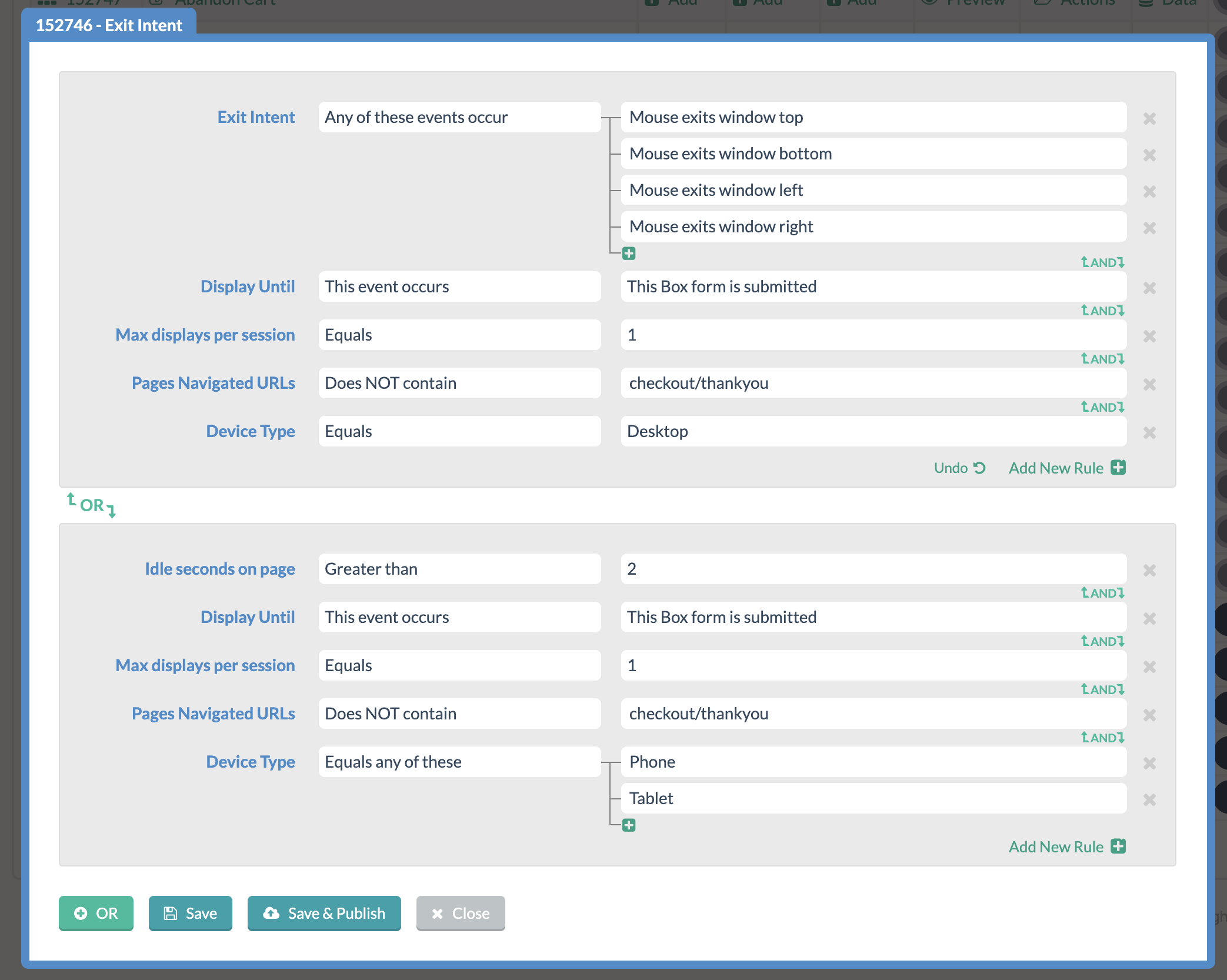
Make sure you show this pop-up at the right time. The screenshot above shows our recommended set of rules for an exit-intent campaign on Desktop and Phone/Tablet.
- The exit-intent rule is set to show the pop-up on desktop whenever the visitor moves their mouse out of the window in any direction, or after 3 seconds of idle time on mobile devices.
- The max displays per session rule ensures visitors only see on campaign once per session. This prevents them from seeing the same campaign multiple times.
- We recommend excluding your thank-you or order confirmation page. If a visitor has already completed a purchase, there’s no need to show them the campaign.