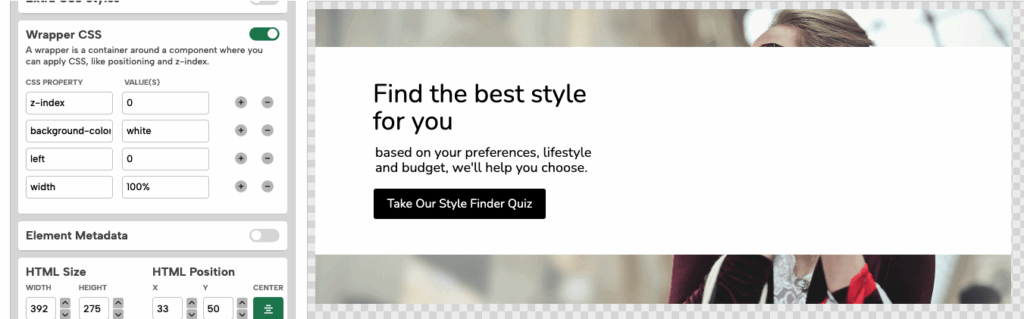
What You’ll Learn
A solid color block can be a good way to visually organize content inside a Digioh campaign. You can use it to:
-
Create section breaks or up panels
-
Add contrast behind text or forms
-
Highlight specific content with a branded background
-
Simulate a full-width row or callout area
Instead of relying on image backgrounds to include these sections, you can insert a blank HTML element with custom styling. This method gives you full control over size, placement, and design — and it works with any layout type. Follow the steps below to easily create one.

1. Add a Blank HTML Element
In the Digioh editor, create a new HTML element in the HTML tab on your Step/Page. Remove any content in the HTML input and leave it blank — we’ll set the styling in another section.

2. Add Background Styling in Wrapper CSS
With the blank HTML element open, add this CSS in the Wrapper CSS section:
z-index : 0
(this will ensure your color block can sit behind any other element)
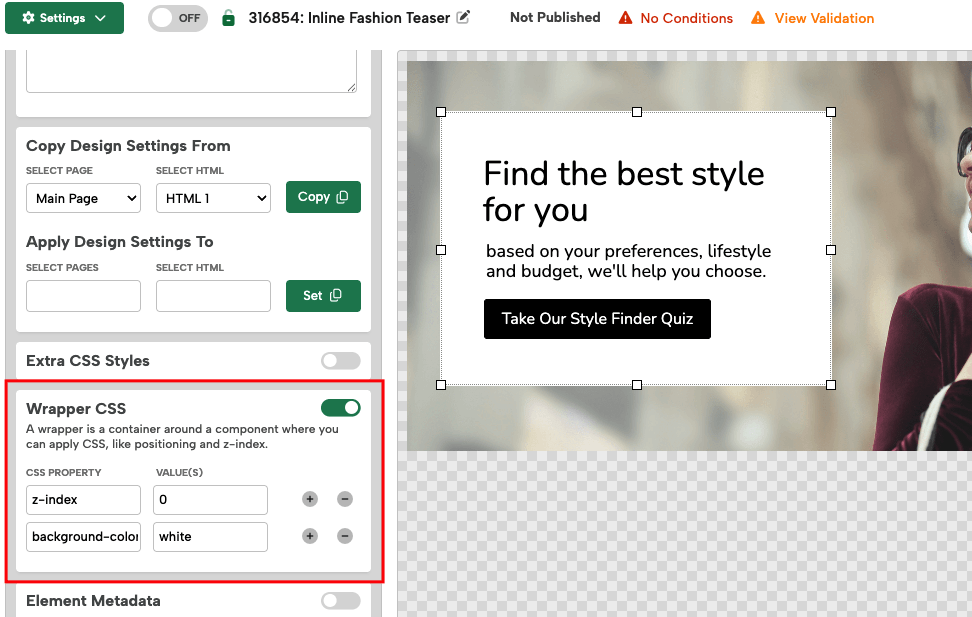
3. Resize and Position the Element
Use the drag-and-drop handles to stretch or move the HTML block where you want it. It can serve as a background banner, section block, or panel.
Optional Styling
To enhance the look of your color block, you can add more styles to the Wrapper CSS as needed. Here are a few examples:
Add a border:
border : 2px solid #000000
Round the corners:
border-radius : 8px
Add a drop shadow:
box-shadow : 0 2px 6px rgba(0, 0, 0, 0.5)

Left : 0