
Duplicating a page in Push Planet allows you to quickly create a new landing page or preference center using an existing design. This is helpful when you want to reuse layouts, styling, or form configurations without rebuilding them from scratch.
To Duplicate a Page
-
Go to Page List in Push Planet HQ.
-
Click the Data icon next to the page you want to copy.
-
Select Duplicate.
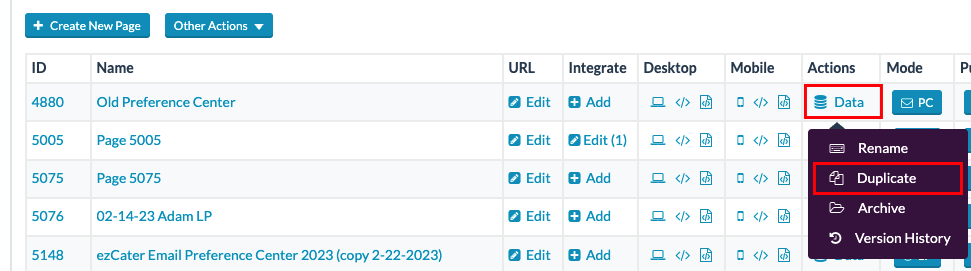
The page will immediately be duplicated.The duplicated page will appear at the bottom of the Page List.
To rename it, open Data again and select Rename.

That’s it. You can now open the duplicated page and customize it as needed.